Understanding .well-known/traffic-advice: The 404 in Your Server Logs
Chrome's privacy preserving prefetch proxy keeps requesting a file most servers never serve. What /.well-known/traffic-advice does, how to write one, and when a tiny JSON file can save your origin from unwanted prefetch traffic.

If you run a public web server and ever read your access logs, you have almost certainly seen this line:
"GET /.well-known/traffic-advice HTTP/1.1" 404 ... "Chrome Privacy Preserving Prefetch Proxy"
It shows up on tiny hobby servers and large production fleets alike. Always the same path, always a 404, always from the same strange user agent. Most people ignore it. Some block it. Almost nobody actually serves it.
That request is Chrome's infrastructure asking your server a polite question: "How much extra traffic are you willing to accept?" This post explains who is asking, why, and how to answer.
Background: prefetching without leaking users
Browsers have long tried to make navigation feel instant by fetching pages before you click them. If Chrome is fairly confident you will tap the first search result, downloading it early means the page is already there when you do.
For links within the same site this is easy. Across sites, it has a privacy problem: if Chrome prefetched example.com while you were still looking at a search results page, example.com would learn your IP address and your interest in it, even if you never visited.
Chrome's answer is the private prefetch proxy. Instead of connecting directly, Chrome prefetches cross-site pages through a CONNECT proxy operated by Google. The TLS connection runs end to end between your browser and the destination server, so the proxy cannot read the content, and the destination server sees the proxy's address instead of yours. If you click, the page loads from local cache and metrics like Largest Contentful Paint improve. If you never click, the site never saw you.
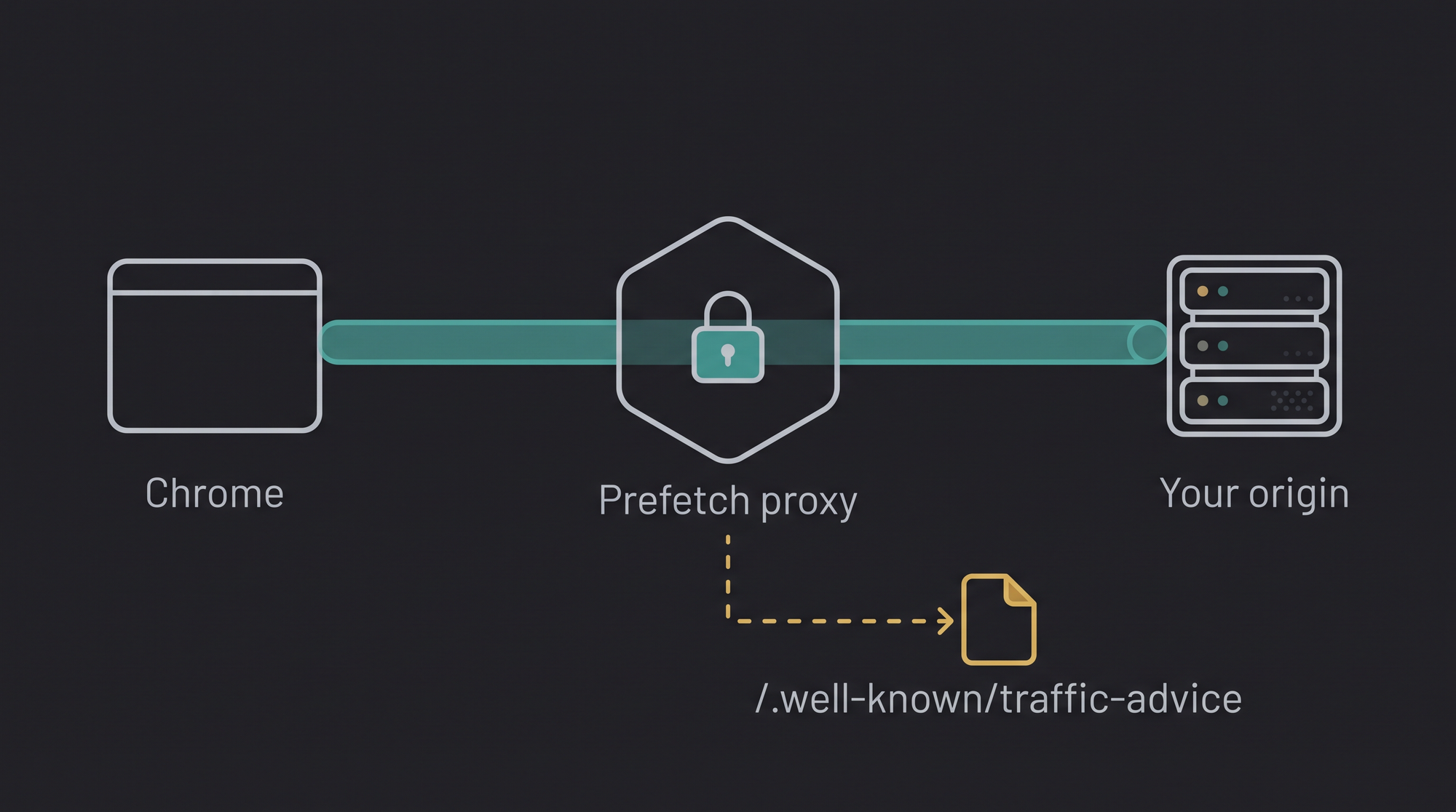
There is a catch, though. Prefetch traffic is speculative by definition. Some fraction of it never turns into a real visit. For a large origin that is a rounding error. For a small one (a side project on a $5 VPS, a metered serverless backend, a server that is already running hot) it is extra load you never asked for. And robots.txt does not cover this case: the proxy is not a crawler indexing your content, it is carrying real user traffic that just has not happened yet.
Well-behaved infrastructure should ask before adding load. So Google's engineers drafted a way to ask.
What /.well-known/traffic-advice is
Traffic advice is a small JSON document at a fixed path, defined in a spec that grew out of the private prefetch proxy project. Think of it as robots.txt for traffic volume rather than crawling: it lets your origin tell self-identified "traffic agents" how much speculative traffic it wants to receive.
The whole thing can be as short as this:
[{
  "user_agent": "prefetch-proxy",
  "disallow": true
}]
It must be served at /.well-known/traffic-advice with the content type application/trafficadvice+json. The document is an array of advice entries, and each entry has up to three fields:
user_agent: which agent the entry applies to."prefetch-proxy"matches Google's private prefetch proxy, and"*"matches any agent that implements the spec. When several entries could apply, the agent picks the most specific one: its own name first, then broader categories, then"*".disallow:truemeans "please do not send me speculative traffic at all."fraction: a number between 0.0 and 1.0 saying what share of prefetch traffic to let through. This field comes from Chrome's implementation and is the practical knob:0.3asks the proxy to attempt only 30% of the prefetches it otherwise would.
So an origin that wants prefetching, but gently, would serve:
[{
  "user_agent": "prefetch-proxy",
  "fraction": 0.3
}]
and could raise the fraction toward 1.0 after watching how the server copes.
Serving it
The only real requirement is the content type. Because the file has no extension, most servers will not guess it correctly on their own.
With nginx, a one-liner location block is enough:
location = /.well-known/traffic-advice {
    default_type application/trafficadvice+json;
    add_header Cache-Control "public, max-age=86400";
    return 200 '[{"user_agent": "prefetch-proxy", "fraction": 1.0}]';
}
With Express:
app.get("/.well-known/traffic-advice", (req, res) => {
  res.type("application/trafficadvice+json");
  res.set("Cache-Control", "public, max-age=86400");
  res.send([{ user_agent: "prefetch-proxy", fraction: 1.0 }]);
});
On static hosts and CDNs, drop the file in place and add a header rule for that exact path so it is served with the right MIME type instead of application/octet-stream.
The fine print
A few details worth knowing before you deploy one:
- It is fetched by the proxy, not by browsers. Google's proxy requests the file itself and caches it according to normal HTTP cache semantics. Set a reasonable
Cache-Controland expect changes to take effect gradually, not instantly. - 404 means "no advice." Agents treat a missing file as "use your defaults," which for the prefetch proxy means prefetching is allowed. All those 404s in your logs are harmless noise, not errors you need to fix.
- It is advice, not enforcement. Only well-behaved agents that implement the spec will honor it. It is not rate limiting, not a firewall rule, and not a security control. Anything abusive will ignore it, just like
robots.txt. - It does not affect normal browsing. Real user navigations, same-site prefetching, and ordinary crawlers are all out of scope. Today, in practice, the only major consumer is Google's private prefetch proxy.
Should you serve one?
For most sites, honestly, no action is needed. Prefetching makes your pages appear faster for real visitors at no cost to you, and the default (no file, 404) leaves it enabled. That is the right call for the typical blog or product site.
Serving one starts to make sense when:
- your origin is capacity constrained and every request matters,
- you pay per request or per gigabyte on a metered backend,
- you are debugging a load problem and want speculative traffic out of the picture, or
- you run internet-reachable staging environments that should not receive extra traffic at all.
And if the mystery 404 simply offends your sense of log hygiene, serving an explicit allow turns it into a clean 200:
[{"user_agent": "*", "disallow": false}]
Small files, clear signals
Well-known paths are quietly becoming the way servers talk to the automated half of the web. We have written before about llms.txt, which tells AI systems where your best content lives, and HSTS, which tells browsers to never downgrade your security. Traffic advice belongs to the same family: one tiny JSON file, one unambiguous signal, and a slightly better-behaved internet.
If you enjoy this kind of practical engineering writing, subscribe below. We publish notes like this alongside updates on what we are building at First Point.